
You can turn off the AI agent in the WhatsApp Business app from the same place you switched it on. Open Tools, find the business AI or agent area, and choose whether to pause the agent, remove it from one conversation, or delete it completely. If the agent answers through a third-party CRM or bot instead, the switch is in that tool's settings, not in WhatsApp.
Last verified: 3 October 2026. WhatsApp changes this screen often, and the feature is still rolling out country by country, so check the official help article linked below if your app looks different.
First, work out which agent is replying
Most people asking this question are dealing with one of three very different things, and the fix is different for each.
- The Meta Business Agent inside the WhatsApp Business app. Meta's own AI assistant, which can answer customer questions from your business profile, catalogue and hours. It is free to add and answers directly from your business number.
- Meta AI in a personal chat. The assistant in the normal WhatsApp app, which has nothing to do with your business account and does not reply to your customers.
- A third-party bot or CRM. A chatbot, helpdesk or automation tool connected to your number through the WhatsApp Business Platform, formerly called the API. This is the one people usually mean when they say "our WhatsApp bot replied nonsense" at scale.
If you are not sure, ask a colleague to send your business number an odd question and watch which system answers. The reply will usually show a signature or a "business AI" label that gives it away.
Turning off the Meta Business Agent
This is the free AI assistant that most people are looking for when they search for this query.
- Open the WhatsApp Business app on the phone that manages the account.
- Go to Tools (sometimes shown as Business tools).
- Open the business AI or agent section, which is where the agent was set up in the first place.
- Choose what you want: pause the agent so it stops replying but keeps your setup for later, remove it from a single conversation, or delete it.
- Read the confirmation message before you accept. Meta explains there what happens to the settings and to what the agent has learned about your business.
WhatsApp documents pause and delete as separate actions in its help centre article, How to pause or delete Meta Business Agent, and it also documents removing the agent from one conversation without switching it off everywhere. That last option is the one most people do not know about, and it solves the common case: a large or sensitive customer who should never get an automatic reply, while everyone else can.
You can also manage the agent from a computer through Meta Business Suite, which is easier if the phone belongs to a staff member.
Because the feature is being released gradually, some accounts do not have the agent section at all yet, and the button names may differ slightly by app version. If your screen does not match, the help centre article above is the page Meta updates first. Do not go hunting for a setting that your account has not been given yet.
Turning off Meta AI in a normal chat
If the assistant you want gone is replying in your personal chats, that is Meta AI, not a business tool. It is separate from your business number and from your customers. Meta documents the available controls in its help centre, and the setting is limited: you can mute or hide the assistant in some surfaces, but you cannot always remove it from every entry point. This is worth checking before you spend an evening on it, because the option you want may not exist in your region yet.
Turning off a third-party bot or CRM
If your number is connected to a chatbot, helpdesk or automation platform, WhatsApp itself has no switch for it. The replies come from software you subscribed to.
- Log in to the tool that owns the number and look for the inbox, agent or automation settings.
- Look for the AI or bot toggle in that tool. Most have a pause, a "hand over to human" option, or both.
- Turn off the automation, not the connection. Disconnecting the number removes your message history and your team's access along with the bot.
- If you cannot get in, the account was probably created by the person who set it up. You may need the platform's support team to hand ownership over.
- Check whether billing kept running. Some tools bill per conversation or per message, and pausing the agent does not always stop the subscription.
A quick way to tell whether the replies are coming from the platform or the app: the WhatsApp Business Platform handles messages through approved templates for anything it sends first, and its replies usually arrive from a business account with no phone in the room. A staff member with the app open will leave typos and take breaks. The bots do neither.
Expect the controls to mislead in the same way Meta's interface screens do. The dashboard shows buttons that wrap programming interface calls and fail with generic messages. Error code 200 means the token lacks a permission, and 133016 means the number is locked for 72 hours. When a switch confuses you, assume the real control lives one layer deeper than the screen you are looking at. Our registration fix documents the pattern.
What changes when you switch it off
Be clear about what you are giving up, because the reason the agent was answering is usually a real one.
- First response time goes back to human speed. If you were replying within seconds at midnight, you will not be any more.
- Repeated questions come back to your inbox. Price, availability, location and delivery, answered by a person again.
- Some chats will simply go cold. A buyer who messages three suppliers at once usually buys from the one who answers first.
- If you were on the WhatsApp Business Platform, message charges stop for the replies you no longer send. Since 1 October 2026, replies to customers on the platform are billed per message. Nigerian rates reported before the change put a utility-class message at roughly $0.0101, about ₦14 at the time, and a marketing message at roughly $0.062, about ₦84, before any provider fees (BusinessDay, 31 August 2026). Check Meta's current rate card, since the final naira figure follows the exchange rate and your message category.
- Your queue becomes manual again. If nobody was watching the inbox while the agent ran, somebody has to start.
If the agent was answering well and only embarrassed you once, pausing everything may cost you more than fixing the one bad answer.
The two-minute triage routine
A middle path works better than either extreme. Decide what the agent may answer alone and what must always reach a person.
- Let it handle facts. Opening hours, location, delivery areas, price, availability, and the link to pay. These answers are verifiable, so a mistake is unlikely and cheap.
- Route anything about money to a human. Refunds, disputes, discounts, failed payments, and anyone who says "I have paid" in a conversation the agent cannot verify.
- Route complaints to a human immediately. An apology from a bot reads as an insult when the customer is already angry.
- Add a handover word. Let customers type "agent" or "human" to reach a person, and honour it every time.
- Give the agent an exit. After two failed attempts to understand a message, it should stop and hand over rather than guess again.
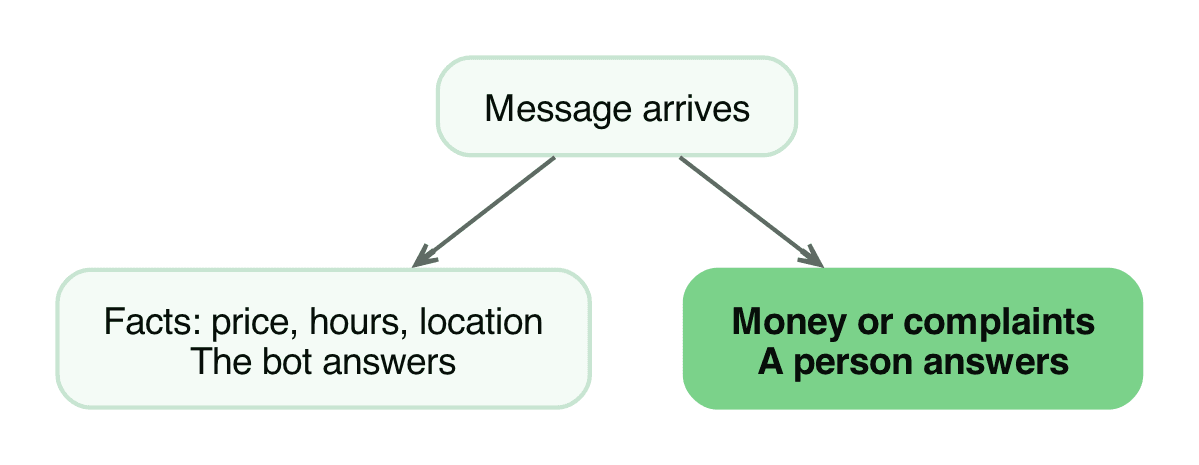
That structure keeps the fast answers fast and removes the embarrassment, which is usually what the reader actually wanted.
This boundary comes from a build that failed. A voice agent we shipped could not handle money conversations, and a bot that apologises while promising a refund it cannot authorise creates a second problem on top of the first. Facts to the bot, money and anger to a person. The full story of that build is why the rule is absolute.
Last verified: 3 October 2026. For the WhatsApp Business Platform bot, the controls live in your CRM or bot tool. For the app's own agent, use the WhatsApp help centre pages linked above.
If you still want automation, just a better one
Switching the agent off is a fine temporary fix and a bad permanent answer if the inbox was genuinely out of control. The useful question is not "should a bot reply" but "which messages should a bot never answer". Answer that, and the system stops being embarrassing.
Our guide to auto-replies that still sound human covers the wording. Our automation practice covers the routing rules: what the bot answers, what it escalates, and how you can see what it did. Bring us the messages it got wrong and we will show you where the boundary should be.
Work with us
We design, build and automate the software Nigerian businesses grow on.
Stay in the loop
Get the latest updates and insights delivered to your inbox.
More like this
WhatsApp Cloud API Registration: Fixing 'Could Not Connect'
You cannot register a number for the WhatsApp Cloud API from the App Dashboard, only from the API. Here is the call that works, the permissions it needs, and the errors you will hit.
Read ArticleWhatsApp Cloud API: number connected, token ready, sends fail
The App Dashboard says your token is generated and the number is connected, then every send fails. Here is the system user fix, step by step.
Read Article