
The App Dashboard says your token is generated and your number shows as connected, then every message you send fails. The cause is usually the system user behind that token, which was never granted your WhatsApp Business Account. Assign the account, generate a new token, and sends start returning 200.
That is the whole fix. The raw API reply, Unsupported request - method type: post, is a generic Graph error that any endpoint can return, so treat it as a symptom and not the diagnosis. The rest of this post shows how we found the real cause. It also covers why the dashboard's one-click button misled us, and ends with a checklist so you do not repeat the afternoon we lost.
The symptom, in two places
The App Dashboard's Send message panel failed first, with a plain message and no code:
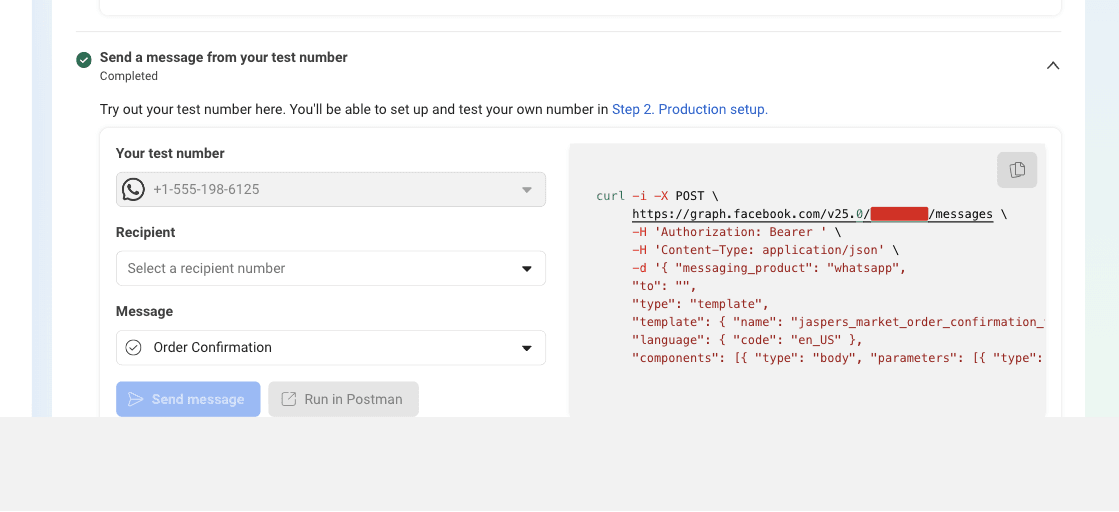
undefinedCouldn't send the test message. Please try again.We then called the Application Programming Interface (API) directly, with a correct payload, and got a stranger answer:
{"error":{"message":"Unsupported request - method type: post","code":100,"type":"GraphMethodException","fbtrace_id":"A2pgGknMwA_OM1pxVY0TVzC"}}The endpoint accepts a POST. The message says the request is unsupported. That contradiction is the first clue that the request never reached the WhatsApp logic at all.
Here is the Node.js call that produced it. Nothing in this request is wrong.
const res = await fetch(
  `https://graph.facebook.com/v25.0/${phoneNumberId}/messages`,
  {
    method: 'POST',
    headers: {
      Authorization: `Bearer ${token}`,
      'Content-Type': 'application/json',
    },
    body: JSON.stringify({
      messaging_product: 'whatsapp',
      recipient_type: 'individual',
      to: '234XXXXXXXXXX',
      type: 'text',
      text: { preview_url: false, body: 'test' },
    }),
  }
)

console.log(res.status, await res.text())
// 400 {"error":{"message":"Unsupported request - method type: post","code":100,"type":"GraphMethodException"}}
New knowledge (first-hand): We hit that exact error on v20.0, v21.0, v23.0, v24.0, v25.0, and v26.0 of the API. The API version was not the cause.
Every error we saw, quoted exactly
If you are debugging this, search for your line below. Each one is copied from a terminal or the browser during this investigation.
The dashboard, when we clicked Send message:
undefinedCouldn't send the test message. Please try again.The API, on every send of a real text or template body:
{"error":{"message":"Unsupported request - method type: post","code":100,"type":"GraphMethodException","fbtrace_id":"A2pgGknMwA_OM1pxVY0TVzC"}}The API, when we sent an empty JSON body {} (a different error, and a useful one):
{"error":{"message":"Your request has violated JSON schema constraint 'required' for the main request body(JSON root), please check the JSON schema for the main request body(JSON root) and make sure your request is valid","type":"OAuthException","code":100}}The API, when we sent POST with no body at all:
{"error":{"message":"(#100) The parameter messaging_product is required.","type":"OAuthException","code":100,"fbtrace_id":"AGwbDybRniozQwzuqb8FipA"}}The API, when we asked for messages with GET instead of POST:
{"error":{"message":"(#100) Tried accessing nonexisting field (messages)","type":"OAuthException","code":100,"fbtrace_id":"AUNqO9qm_wmTkJArLpO_Ho-"}}The API, on one transient call while a stale token sat in the browser field:
{"error":{"message":"Authentication Error","code":190,"type":"OAuthException","fbtrace_id":"AZwDGMQSpwKvjlnIJcb2oXD"}}The response header that sent us down the wrong path:
undefinedproxy-status: http_request_error; e_proxy="..."; e_fb_zone="..."; e_clientaddr="..."The response we wanted, once the token was right:
{"messaging_product":"whatsapp","contacts":[{"input":"234XXXXXXXXXX","wa_id":"234XXXXXXXXXX"}],"messages":[{"id":"wamid.HBgNXXXXXXXXXXXXXXXXXXXXXXXXXXXXXXXXXXXXXXXX"}]}That last block is the send endpoint accepting the request. Delivery is confirmed separately in a statuses webhook.
How we found the cause
The empty body test above is the hinge. A POST with {} returned a normal schema complaint, and a POST with no body returned messaging_product is required. Both replies prove the request reached the Graph handler. Only a body with messaging_product inside triggered the method-type error.
That moved the investigation off the request and onto the account. We checked the parts that usually break, and all of them were healthy.
- Number status:
GET /{phone-number-id}?fields=status,platform_type,account_modereturnedCONNECTED,CLOUD_API,LIVE. - Ownership code:
GET /{phone-number-id}?fields=code_verification_statusreturnedVERIFIED. - Account health:
GET /{waba-id}?fields=status,account_review_statusreturnedACTIVE,APPROVED. - App subscription:
POST /{waba-id}/subscribed_appsreturned{"success":true}. - Token type and scopes: the Access Token Debugger showed
SYSTEM_USERwithwhatsapp_business_managementandwhatsapp_business_messaging.
Every read worked. Only writes to POST /messages failed. That split, reads fine and sends blocked, points at a permission that applies to writes.
The commands that mattered
Run these in order. Step 2 is the one that cracked it.
# 1. Reproduce the failure. A wrong token returns the method-type error.
curl -s -X POST "https://graph.facebook.com/v25.0/{phone-number-id}/messages" \
  -H "Authorization: Bearer {token}" \
  -H "Content-Type: application/json" \
-d '{"messaging_product":"whatsapp","to":"{recipient}","type":"text","text":{"body":"test"}}'# 2. Reveal who the token belongs to. This named the wrong system user.
curl -s "https://graph.facebook.com/v25.0/me" \
-H "Authorization: Bearer {token}"
# Full detail: type, app, scopes, and the system user name.
curl -s "https://graph.facebook.com/v25.0/debug_token?input_token={token}&access_token={token}"# 3. Confirm the number and the account are healthy.
curl -s "https://graph.facebook.com/v25.0/{phone-number-id}?fields=display_phone_number,status,platform_type,account_mode,code_verification_status" \
-H "Authorization: Bearer {token}"
curl -s "https://graph.facebook.com/v25.0/{waba-id}?fields=name,status,account_review_status" \
-H "Authorization: Bearer {token}"# 4. Prove the request reaches the Graph handler. Neither reply is the method-type error.
curl -s -X POST "https://graph.facebook.com/v25.0/{phone-number-id}/messages" \
-H "Authorization: Bearer {token}" \
-H "Content-Type: application/json" -d '{}'
curl -s -X POST "https://graph.facebook.com/v25.0/{phone-number-id}/messages" \
-H "Authorization: Bearer {token}"Step 4 is the reason we stopped blaming the request. An empty body and no body both reach the endpoint and return normal validation errors. Only a body that carries messaging_product fails, which means the request is fine and the account is the problem.
New knowledge (first-hand): The decoded token named a system user we had not chosen, Conversions API System User. It was created for the app's other use case, the ads and Conversions side, and it had never been granted the WhatsApp Business Account.
Scopes are not the same as account access
Meta applies two permission layers, and to a developer they look identical.
- Scopes, which the token debugger lists as
granted. - Business asset access, which decides whether that system user can touch a specific WhatsApp Business Account (WABA).
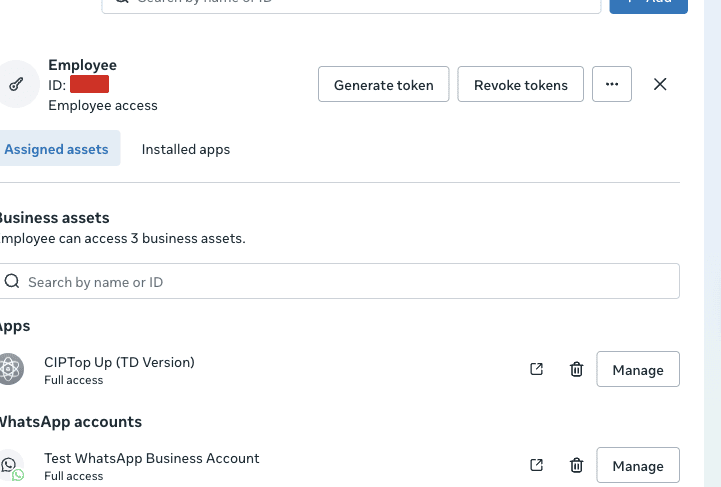
Meta's Access Tokens guide separates the two system user roles. An Admin system user has full access to every account in the portfolio by default. An Employee system user must be granted access to each account individually. The account our app sends from, and the token we used, belonged to an Employee system user with no account grant.
The guide also states that a missing asset grant returns error code 200. Our failure returned code 100 with GraphMethodException. The documented signal and the real one do not match, which is why the error sends people hunting for a request bug that does not exist.
Why the App Dashboard's Generate token button misleads you
This is the part we would change if we worked at Meta.
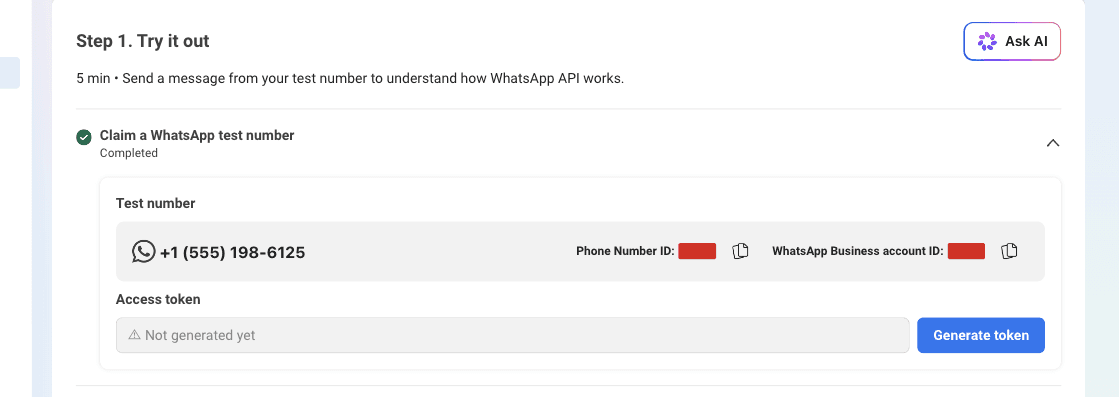
The Send message panel has a Step 1: Generate token button. We clicked it, cleared Two-Factor Authentication (2FA), and got a green success. The copy promised "a permanent access token for your WhatsApp Business account to send messages via the API." Then every send failed.
Four design choices caused that.
- The button never names the system user. Which system user owns the token is the single fact that decides success, and the dialog does not show it.
- The button never checks account access. It returns success for a token that cannot possibly send a message.
- The token debugger shows scopes, not asset access, so a broken token still reads as all green.
- The error lives on a different endpoint. The send fails later, in the messages API, with a message that describes a method problem instead of a permission one.
New knowledge (first-hand): We only found the wrong system user after decoding the token and reading the name field. Nothing in the dashboard told us.
One more source of confusion sits on top of this. The App Dashboard historically produced short-lived User access tokens. Meta's own guide describes the correct route as a manual flow in Business Settings.
Create a system user, grant Manage app, assign the account, then generate the token. The one-click button skips the assignment step, so the fast path and the documented path disagree.
The fix, step by step
- Open Business Settings, then Users, then System users.
- Check which system user owns the token you are using. If it is not one you created for WhatsApp, stop using it.
- To avoid the problem entirely, create or use an Admin system user. Admin users inherit access to every account in the portfolio.
- If you keep an Employee system user, open it, click Assign assets, choose WhatsApp accounts, tick the account that holds your sending number, and set Full access.
- Click Generate token. Select your app and a token expiry (Never for a server).
- Enable the three permissions Meta lists:
business_management,whatsapp_business_management,whatsapp_business_messaging. - Copy the token once. It is shown a single time.
- Replace the value in your server's environment, then restart the process that sends messages.
The confirm call is one line. Put your own Phone Number ID and token in the placeholders:
curl -s -X POST "https://graph.facebook.com/v25.0/{phone-number-id}/messages" \
  -H "Authorization: Bearer {token}" \
  -H "Content-Type: application/json" \
  -d '{"messaging_product":"whatsapp","to":"{recipient}","type":"text","text":{"body":"test"}}'
A 200 with a wamid means the fix worked.
In a Node.js service, wrap the same call and keep the token and the Phone Number ID in the environment.
WHATSAPP_ACCESS_TOKEN=EAA...
WHATSAPP_PHONE_NUMBER_ID=123456789012345const sendWhatsAppText = async ({ to, body }) => {
const res = await fetch(
`https://graph.facebook.com/v25.0/${process.env.WHATSAPP_PHONE_NUMBER_ID}/messages`,
{
method: 'POST',
headers: {
Authorization: `Bearer ${process.env.WHATSAPP_ACCESS_TOKEN}`,
'Content-Type': 'application/json',
},
body: JSON.stringify({
messaging_product: 'whatsapp',
recipient_type: 'individual',
to,
type: 'text',
text: { preview_url: false, body },
}),
}
)
const data = await res.json()
if (!res.ok) throw new Error(JSON.stringify(data))
return data // { messages: [{ id: 'wamid...' }] }
}The response carries a messages array with a WhatsApp message ID (wamid). Track that ID against the statuses webhook to confirm delivery. The exact success response is quoted near the top of this post.
Checklist to confirm you are out of the woods
Limits and exceptions
This fix applies when the token is the only thing wrong. It will not help if the account is disconnected, which has a different symptom: sends fail while WhatsApp Manager still shows the number as connected. Other developers have reported that case and could not resolve it.
The same root cause hides behind other tools. An n8n user reported 400 Bad Request: Unsupported request - method type: post from the WhatsApp node while an HTTP node returned a message ID but no delivery (n8n community thread, September 2026). The credential was the thing to check, not the node.
A 200 from the send endpoint means Meta accepted the request. It does not mean the message arrived. Watch for a statuses webhook with status: failed, and read the errors array for the real reason. The support page lists the common causes.
Two settings bite people right after this fix. A newly registered number has its display name reviewed, so check name_status if your profile looks wrong (display names). Business-initiated template messages also need a payment method on the account.
The advice stops at one business and one app. If you manage several portfolios or act for clients, the asset rules change, so read the Access Tokens guide in full before designing the setup.
What to do next
Decode your token, find the system user behind it, and assign the WhatsApp Business Account before you generate anything. If you would rather have the sending, templates, and number setup handled for you, see how we run WhatsApp for businesses.
When the system user is right, the cryptic error disappears and the endpoint behaves exactly as the documentation says it should.
Work with us
We design, build and automate the software Nigerian businesses grow on.
Stay in the loop
Get the latest updates and insights delivered to your inbox.
More like this
WhatsApp Cloud API Registration: Fixing 'Could Not Connect'
You cannot register a number for the WhatsApp Cloud API from the App Dashboard, only from the API. Here is the call that works, the permissions it needs, and the errors you will hit.
Read ArticleWhatsApp Cloud API bot: every error we hit and how we fixed it
We built a WhatsApp bot end to end. Here is every error Meta returned, quoted verbatim, with the fix for each one.
Read Article