
If you added a number in WhatsApp Manager, then tried to connect it to the WhatsApp Cloud API and hit a vague "Could not connect" error, you are not alone. The message gives no code, no reason and no next step. People open a browser tab, click Retry, and get nowhere.
You cannot register a number for the Cloud API from the interface. Meta's own documentation says so, then buries it. Here is what is actually happening, and the one request that fixes it.
What Meta's documentation says
The phone number registration reference is explicit:
"To use your business phone number with Cloud API you must register it. You can only register a number via the API. You cannot register a number through WhatsApp Manager (WAM) or the App Dashboard."
Meta splits onboarding into three steps:
- Add the number to your WhatsApp Business Account (WABA), through WhatsApp Manager
- Verify ownership by SMS or voice code, through WhatsApp Manager
- Register the number for Cloud API, over the API only

Why it is confusing
The documentation contradicts itself. The business phone numbers page lists the App Dashboard, Meta Business Suite and WhatsApp Manager under registration methods, then adds a note that those surfaces only "add a phone number and verify your ownership, but they do not register the number for Cloud API use."
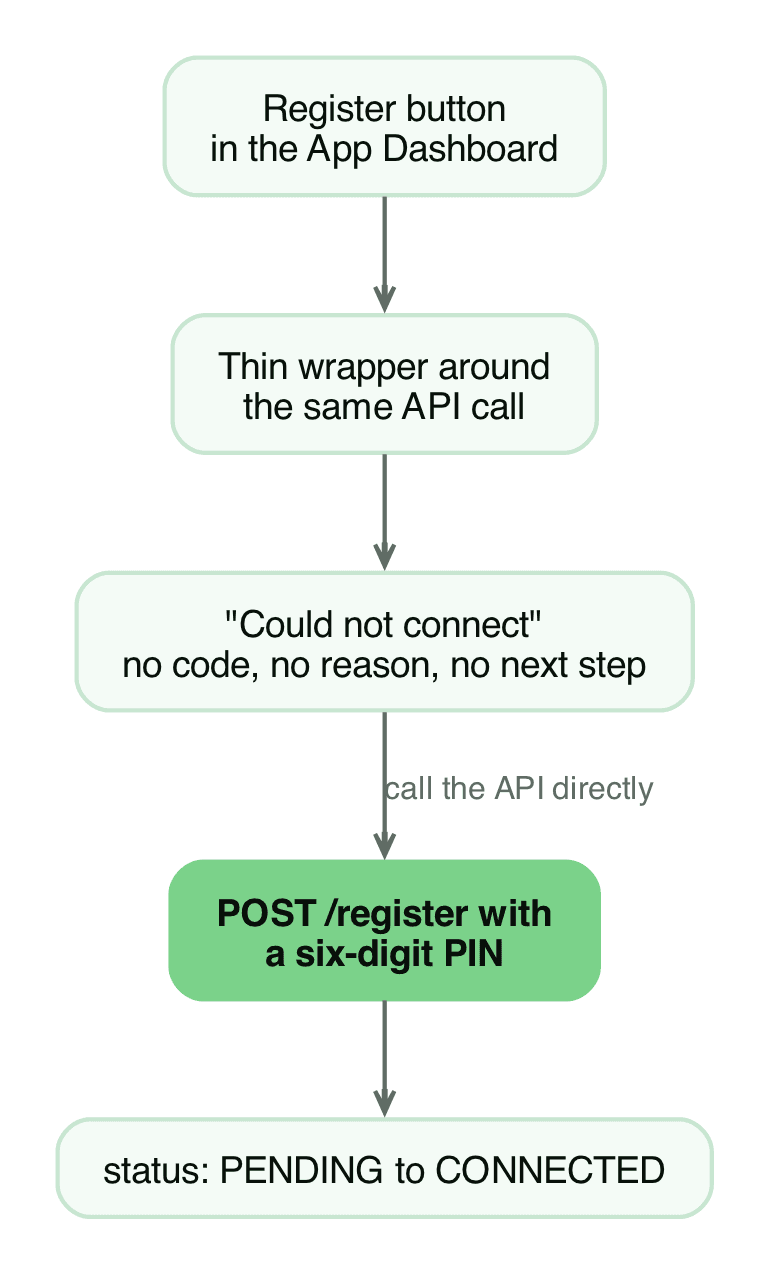
The App Dashboard does show a Register button. It is a thin wrapper around the same request, and when it fails it surfaces the generic "Could not connect" message. The interface looks like the intended path and quietly is not.
There is a security reason for the API-only rule. Registration is where the number's two-step verification PIN is set. Meta notes that it "enforces two-step verification during account creation to add an extra layer of security." Registration is a provisioning call, not a toggle, which is why the request takes a pin parameter and why the limit is 10 requests per number per 72 hours.
The fix: register over the API
You need three things from the App Dashboard, under "Use cases", step 2, "Register your WhatsApp phone number":
- The Phone Number ID, which identifies the number
- The WhatsApp Business Account ID (WABA ID), which identifies the account
- An access token carrying the
whatsapp_business_managementandwhatsapp_business_messagingpermissions. Use a System User token, not the short-lived dashboard token
Step 1: Confirm the number and token
curl -s "https://graph.facebook.com/v25.0/<PHONE_NUMBER_ID>?fields=display_phone_number,code_verification_status,name_status,status" \
  -H "Authorization: Bearer $TOKEN"
code_verification_status must read VERIFIED. If you get error code 200 instead, your token is missing a permission.
Step 2: Register with a six-digit PIN
curl -s -X POST "https://graph.facebook.com/v25.0/<PHONE_NUMBER_ID>/register" \
  -H "Authorization: Bearer $TOKEN" \
  -H "Content-Type: application/json" \
  -d '{"messaging_product":"whatsapp","pin":"123456"}'
You get {"success":true} back. Because two-factor verification was not set yet, that PIN becomes the number's two-step verification PIN. Store it safely.
Step 3: Verify it connected
Run the Step 1 call again. status moves from PENDING to CONNECTED, and the number's platform_type becomes CLOUD_API.
Doing it in code
Wrapping the call in a helper makes it repeatable instead of copy-pasted:
const register = async (phoneNumberId: string, token: string, pin: string) => {
  const res = await fetch(
    `https://graph.facebook.com/v25.0/${phoneNumberId}/register`,
    {
      method: 'POST',
      headers: {
        Authorization: `Bearer ${token}`,
        'Content-Type': 'application/json',
      },
      body: JSON.stringify({ messaging_product: 'whatsapp', pin }),
    }
  )
  const body = await res.json()
  if (!res.ok) throw new Error(JSON.stringify(body))
  return body // { success: true }
}
Errors you will hit
- Error code 200. The token lacks
whatsapp_business_management. - Error code 133016. Too many registration attempts. The number is locked for 72 hours.
- No
successreturned. The number is already registered. SendPOSTto/<PHONE_NUMBER_ID>/deregisterfirst.
This is not the only Cloud API error
Registration is only one step of getting a number live. Two failures we hit on the same project are written up separately: the case where the App Dashboard says your token is generated and the number is connected, then every send fails, and the full list of bot errors with the fix for each. If your send fails after registration succeeds, read that one instead.
If you would rather not debug this yourself, talk to us about the WhatsApp automation and we will take the API setup as part of the build.
The short version
The "Could not connect" error is not a bug. It is the interface attempting something Meta only supports over the API. Add the number and verify ownership in WhatsApp Manager, then register it with a single POST. That is one request, one PIN, and the number flips to CONNECTED.
Work with us
We design, build and automate the software Nigerian businesses grow on.
Stay in the loop
Get the latest updates and insights delivered to your inbox.
More like this
WhatsApp Cloud API: number connected, token ready, sends fail
The App Dashboard says your token is generated and the number is connected, then every send fails. Here is the system user fix, step by step.
Read ArticleWhatsApp Cloud API bot: every error we hit and how we fixed it
We built a WhatsApp bot end to end. Here is every error Meta returned, quoted verbatim, with the fix for each one.
Read Article