
Business workflow automation is easy to define and hard to do well: a computer watches for an event, then runs the steps you would otherwise run by hand. A payment lands, so the receipt goes out and the ledger updates. A form is filled, so the folder is created and the kickoff is booked.
Now the scene. It is 8pm, Tuesday. Your salesperson is copying phone numbers from a WhatsApp chat into a spreadsheet, your accountant is matching bank alerts to invoices line by line, and someone else is photographing receipts for month end.
Below are fifteen workflow automation examples for small business owners, written to be copied. Each gives the trigger, the steps, the tools that make sense in Nigeria, and a measurable result. The numbers are illustrations, not promises.
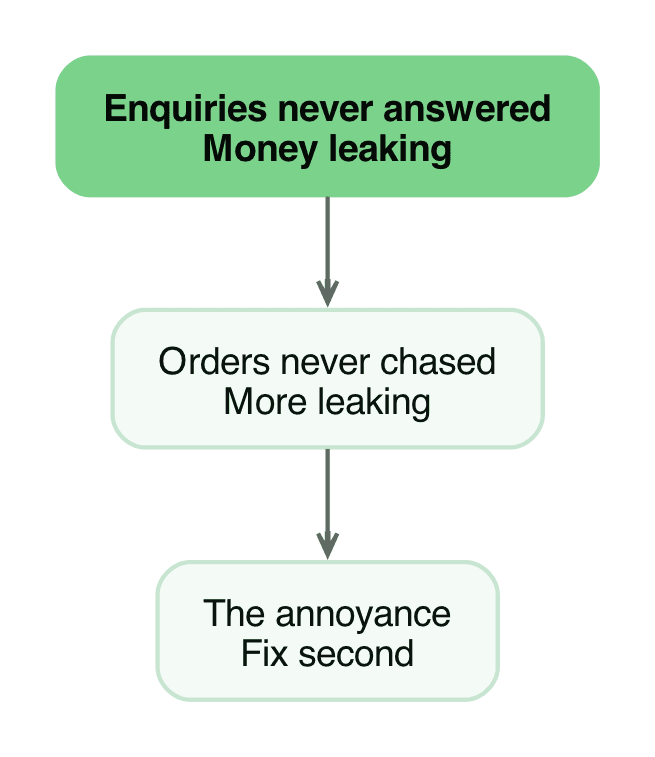
A founder once asked us to fix delivery disputes eating his week. His assistants were buried in unanswered buyer questions, chats falling through with nobody going back, orders abandoned and never chased. The annoying problem was not the expensive one, and we built the enquiry follow-up first. This list follows that order throughout: money first, irritation second. The full story carries the scoring method behind it.
Which workflows are worth automating
Three tests. If a workflow fails more than two, leave it alone.
- It happens often. Twenty times a week is a workflow. Twice a quarter is a note on the wall.
- You can write the steps on one page. If two staff disagree about what happens next, the automation will be wrong half the time.
- A mistake is survivable. Start where a wrong message costs an apology, not a regulatory filing.
Name the finish line before you build. Without one, you are ready to document the workflow, not automate it.
The 15 workflows
1. Sales follow-up after an enquiry or quotation
Trigger: An enquiry arrives on WhatsApp Business, your website form, or your business email.
Steps: Capture the name, phone, product, budget and source into your sheet or CRM. Send one reply with the price, delivery window and next step, then create a follow-up task for the next morning. Without a reply after three days, send one reminder. After seven, mark the lead cold and move it to a monthly nurture list.
Tools: WhatsApp Business Platform, Google Sheets or HubSpot for the record, n8n or Make to join them. Templates need approval, so write them plainly. Below ten enquiries a week, a quick reply is cheaper.
Result (example): Every enquiry gets a reply within minutes instead of hours. Nigerian buyers often message three suppliers at once, and the first reply usually wins.
2. Invoice generation and delivery
Trigger: An order is marked confirmed in your sheet, POS, or ecommerce backend.
Steps: Read the order lines and prices. Generate a numbered PDF invoice with your bank details and payment reference, then email it, send it on WhatsApp, and log the number, amount and due date.
Tools: QuickBooks or Zoho Books, or Google Sheets under roughly 50 invoices a month. Gmail to send, n8n or Zapier to trigger. Zapier is wrong at hundreds of invoices monthly, because task pricing climbs fast. Power Automate only suits a business already living in Microsoft 365.
Result (example): Invoices leave the same day the order is confirmed, and references stay consistent, removing most "which invoice is this?" questions.
3. Payment reminders that escalate politely
Trigger: An invoice passes its due date unpaid.
Steps: Check the payment record first. If money arrived, stop. If not, send a friendly reminder on day three with the amount and reference, then a firmer one on day seven. On day fourteen, hand it to a person and stop.
Tools: QuickBooks or Zoho Books reminders, Paystack or Flutterwave webhooks for online payments, n8n or Make for a custom ladder. Reconciliation runs before the reminder step, never after.
Result (example): Chasing becomes a schedule rather than a mood. Most late payers clear within two messages, and staff stop spending two hours a day on "please, any update?".
4. Receipt and expense capture
Trigger: A staff member photographs a receipt or supplier invoice.
Steps: Drop the file into a dated Drive folder from a phone shortcut. Run OCR to pull the merchant, amount, date and VAT, then write those fields into the expense sheet with the Drive link beside them. Flag anything below your confidence threshold.
Tools: Google Drive and Sheets, an OCR service, n8n to connect them, Google Apps Script to stay free. This is document workflow automation at its most useful. Keep a review step before anything reaches your statutory books.
Result (example): Month-end typing disappears, and missing-receipt queries resolve in seconds because the image sits beside the entry.
5. Purchase approvals above a limit
Trigger: A purchase request or supplier invoice arrives.
Steps: Read the amount. Below your limit, approve and log it automatically. Above it, post the request into an approval channel with the document attached, then wait for "approve" or "reject". On approval, file the document and notify accounts payable. Otherwise archive it with the reason.
Tools: Google Forms, Slack or WhatsApp for the decision, Drive for filing, n8n or Make for the routing. Keep the approver list short and named. Five approvers and no owner will stall like the paper version.
Result (example): Small spends stop waiting for a signature, and every large spend carries a timestamp and a name.
6. Client onboarding from signature to kickoff
Trigger: A new client pays a deposit or signs the engagement letter.
Steps: Create the client folder from your template, add the client to the tracker, and provision access to shared files. Send the welcome email with the checklist and named contact, then book the kickoff. Nudge the account manager if it is not booked within two working days.
Tools: Google Drive and Sheets, Google Calendar or Calendly, Gmail, n8n or Zapier. DocuSign is overkill below a certain deal size. A signed PDF on WhatsApp plus a stamped letter works here, if the record is stored.
Result (example): Onboarding stops depending on one person remembering, and every client starts from the same checklist.
7. New hire onboarding and equipment handover
Trigger: An offer is accepted and a start date is set.
Steps: Create the staff record and payroll entry. Generate the contract from a template, request a signature, and send the welcome pack with the first-day schedule. Assign a buddy and add the new hire to the right groups. Create the equipment checklist, plus a task to confirm every item is returned when the person leaves.
Tools: Google Sheets or Zoho People, Drive for templates, Gmail, n8n for the checklist tasks. If you hire once a year, do it manually.
Result (example): The first day runs without the founder running around, and nobody discovers three months later that the laptop was never recorded.
8. Leave requests and payroll inputs
Trigger: An employee submits a leave request.
Steps: Check the request against their balance and route it to the line manager. On approval, update the balance, add the dates to the calendar, and notify the team channel. Write the days into the payroll input sheet for that month, and alert the manager if two people on one team request the same week.
Tools: Google Forms and Sheets, Calendar, Slack or WhatsApp, n8n. Skip the build under five staff. The conversation takes ninety seconds anyway.
Result (example): Leave balances stop being a guess in December, and payroll stops requiring phone calls to reconstruct who was away.
9. Inventory reorder alerts
Trigger: A stock quantity drops to its reorder level.
Steps: Detect the crossing, not just the state, so the alert fires once rather than hourly. Check whether an open purchase order already covers the item. If not, create a purchase request with the supplier, last price and lead time, then notify the buyer. If stock is below this week's orders, mark it urgent.
Tools: Google Sheets for small catalogues, Zoho Inventory or QuickBooks Commerce past a few hundred SKUs, n8n or Make for the logic. A spreadsheet formula sends an email, but it cannot check for an open purchase order, and that gap causes duplicate orders.
Result (example): Fewer out-of-stock days on best sellers, and fewer panic orders at retail price.
10. Appointment booking and reminders
Trigger: A customer books, or a service date approaches.
Steps: Confirm the booking and add it to the calendar. Send a reminder 24 hours ahead with the address, time and what to bring, then ask for a one-tap confirm, reschedule or cancel. Without a confirmation, send one more message two hours before and release the slot.
Tools: Google Calendar or Calendly, WhatsApp Business Platform or SMS, n8n or Make, Power Automate if you run Microsoft 365 and want Outlook handled. WhatsApp templates are metered, so price your volume first.
Result (example): No-shows fall and staff stop calling every client the day before. For clinics, salons and repair shops, this is usually the cheapest workflow here to run.
11. Support triage across WhatsApp and email
Trigger: A customer message arrives.
Steps: Classify it as order status, price, complaint, refund, or something else. Answer routine categories from a written answer bank using the live record, then route complaints and refunds to a named human. Tag the conversation and log the category. Escalate anything unclassified.
Tools: WhatsApp Business Platform, Gmail, a helpdesk such as Freshdesk or Zoho Desk once volume justifies it, n8n for the routing. Do not auto-send LLM classifications without an answer bank you would publish.
Result (example): First response time moves from hours to minutes on routine categories, and the human queue stops holding questions the price list could answer.
12. Reporting that assembles itself
Trigger: A schedule, for example 7am daily or the first working day of the month.
Steps: Pull orders from the ecommerce platform, payments from Paystack or Flutterwave, and expenses from the sheet into one summary: revenue, top sellers, outstanding invoices, cash in and out. Render a PDF and email it, or post it to the founders' group. Keep the raw rows in one place so anyone can check a figure.
Tools: Google Sheets and Apps Script, n8n or Make for the assembly, QuickBooks for accounting-grade numbers. A report built on three conflicting records argues with itself faster, so fix the source of truth first.
Result (example): The month-end rebuild drops from two evenings to a ten-minute review, and the numbers arrive while there is still time to act.
13. Contract intake and clause flagging
Trigger: A contract, retainer or engagement letter arrives by email.
Steps: Save it to the client folder with a consistent file name. Extract the parties, term, notice periods, payment terms and renewal date. Flag clauses on automatic renewal, penalty interest, unlimited liability or exclusivity. Create a review task, then log every key date.
Tools: Google Drive and Sheets, a document AI extraction service, Gmail, n8n. This is the right place for automation in a law practice or an accounting firm, and the wrong place for the advice itself. A workflow can flag a clause, not tell you to sign.
Result (example): Nothing auto-renews unnoticed, and a contract review starts from a one-page summary instead of a forty-page read.
14. Compliance and renewal deadline tracking
Trigger: A renewal or filing date is added, or a recurring date approaches.
Steps: Keep one register: licences, tax filings, insurance, domain names, certifications, statutory returns. Send reminders at 60, 30, 14 and 3 days. Require a human to mark each item done, and escalate until someone does. Review quarterly for gaps.
Tools: Google Sheets and Calendar, n8n or Make for the reminders, Trello or Asana for ownership. This fails when nobody owns the register. Automation sends the reminder, not the filing.
Result (example): Fewer late filings and renewal penalties, plus one place to check whether a licence is current.
15. Retainer and subscription renewals
Trigger: An engagement nears its renewal date, or a subscription payment fails.
Steps: Check usage and delivery history, then prepare the renewal summary from the reporting workflow. Send it with the renewal invoice 30 days before the end date. If payment fails, retry once and notify the customer. After two silent attempts, create a task.
Tools: Google Sheets or HubSpot, QuickBooks or Zoho Books, Paystack or Flutterwave subscriptions, n8n or Make for the logic. Card recurring billing is weaker in Nigeria than transfer, so expect manual follow-up.
Result (example): Renewals stop being discovered after they lapse, and revenue that used to leak quietly gets a process around it.
How to pick your first three
Do not start with fifteen. Start with three, in this order.
- The one that touches money first. Invoice generation, payment reminders or reconciliation. Cash problems are what founders feel immediately.
- The one that touches a customer. Sales follow-up or appointment reminders. Speed here shows up in revenue within weeks.
- The one that removes a recurring evening of work. Receipt capture or reporting. This buys back hours you can point at.
Then build the boring infrastructure once: one customer record, one place where numbers live, one alert channel where failures land. If your data sits in a notebook, three WhatsApp chats and a POS that cannot export, fix that first. Every workflow above reads from those records.
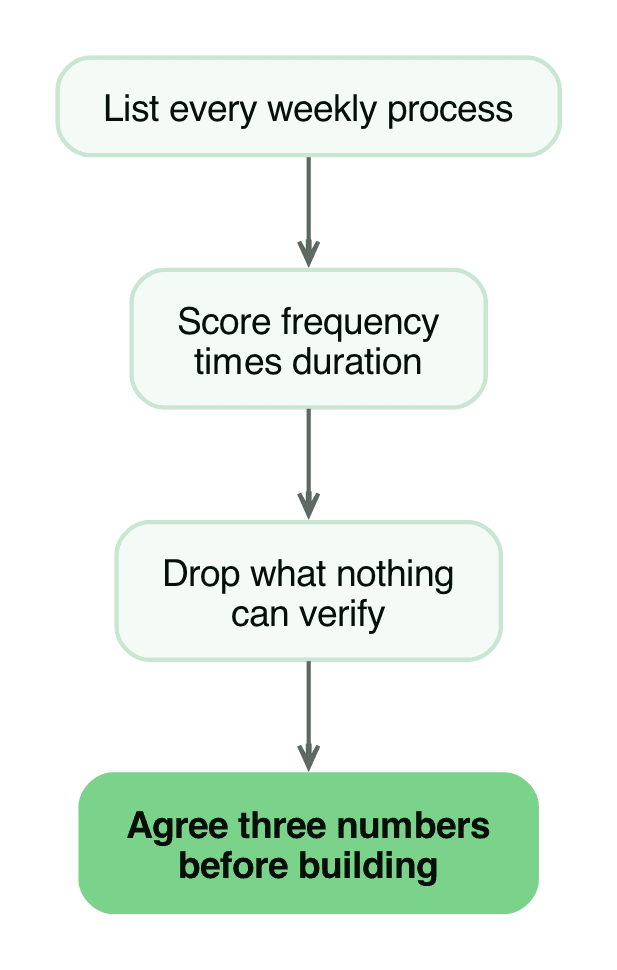
Score each candidate on frequency multiplied by duration, then drop anything where a mistake costs more than the saving and nothing can verify the result. What survives is your shortlist. For each survivor, agree three numbers before building: how fast the first reply goes out, what share finishes without staff touching it, and what each resolved case costs once subscriptions and message fees are counted.
Judge the build against the leak the plan priced, not against another quote. Across our builds, a system that gets used tends to pay back several times its cost once it runs, because the leak was measured before anything was built. That is the pattern we observe and the target we hold ourselves to, not a promise. Your number gets written in the plan before you spend anything.
What breaks in practice
- Duplicate records. Two triggers fire for one event, or a retry runs after a timeout that actually succeeded, so you get two invoices or two onboarding tasks. Fix it with an idempotency key: every record carries a unique reference, and the workflow rejects a second one.
- Silent failures. The workflow runs, the API returns an error, and nobody notices until a customer complains. Never assume a run means success: log it and check the response.
- No error alerting. If failures do not land in a channel somebody reads daily, your automation has no heartbeat. A manual process at least fails visibly.
- API limits. Rate limits and quotas bite exactly when volume spikes. Know each limit and add retries with a delay.
- USD card requirements. Most foreign automation tools bill in dollars on a card, and many Nigerian business cards fail on international payments. A tool you cannot renew is a tool you will lose mid-quarter.
- WhatsApp template friction. Outbound messages need approved templates and are metered per message. Free-form replies inside the 24-hour customer window are easier, so design around it.
- Free-tier ceilings. Zapier, Make and Power Automate count tasks or runs. A seven-step retry ladder burns quota faster than the demo suggested.
- Timezone and date logic. Servers often run on UTC while Nigeria runs on WAT, so a reminder meant for 8am arrives at 9am. Test the times you care about.
- Automation drift. Platforms change rules, prices change, your catalogue changes. A workflow that worked in October can degrade by January. Put a review date on everything you build.
- Process decay underneath. Staff stop following the process, the automation keeps running on stale habits, and the output stops matching reality. Automation multiplies a working process and accelerates a broken one.
Name the person who owns the exception queue before you build. Skip anything that needs judgement you would not delegate to a new intern: pricing exceptions, refund decisions, legal advice, and anything a regulator will ask about.
Last verified: 3 October 2026. Tool names, pricing models and WhatsApp message rules change, so check current documentation before you commit budget.
Where to start
Write your three workflows on a single page each, with the trigger, steps and finish line, then count what each costs you today in hours. That is the brief. If you would rather not build it yourself, you can get a workflow audit or have the workflow built for you, and we will start with the questions this article opened with rather than a product demo.
Work with us
We design, build and automate the software Nigerian businesses grow on.
Stay in the loop
Get the latest updates and insights delivered to your inbox.
More like this
Workflow Automation for Small Businesses: Where to Start
Where to start with workflow automation in a Nigerian small business, which processes to leave alone, what it costs to run, and the order that stops projects stalling.
Read ArticleCRM for Small Businesses That Still Run on Memory
If customer records live in your head, a notebook and WhatsApp, here is the simplest CRM for small business in Nigeria, what it costs, and when software is worth it.
Read Article