

n8n is a workflow tool where you connect apps by dragging nodes onto a canvas and wiring them together. It is free if you host it yourself, and paid per workflow execution if you use its cloud. For a beginner, the first ten workflows worth building are the boring ones: form to sheet, payment confirmation to receipt, enquiry to reply, invoice to reminder.
The ten below follow patterns from work we have actually shipped: food ordering inside WhatsApp for a vendor, scheduled bill payments for CIP TopUp, receipt scanning with custom classification for a UK agency serving more than 300 clients, and a recruiting pipeline we inherited that failed quietly as volume grew. The templates are generic. The failure modes beside each one are observed. Our field notes on small-business automation carry the full stories.
Last verified: 3 October 2026. Prices, node names and limits below come from n8n's own pricing and documentation pages on that date. Check them again before you commit, because this tool ships changes weekly.
What is n8n good at for beginners?
- Mixing no-code with code. You can drag a node for the easy part and drop a line of JavaScript into the same workflow for the awkward part. That combination is why technical teams pick it over a pure no-code tool.
- Self-hosting. You can run it on your own server, which keeps customer data on infrastructure you control and removes the per-execution meter.
- Moving data between systems that do not talk. Paystack, Google Sheets, Gmail, HubSpot, Zoho, Telegram, and hundreds more.
- AI steps inside a real process. A language model node in the middle of a workflow is far easier to monitor than a standalone chatbot.
Where n8n is the wrong tool
- You are not technical and do not want to be. A self-hosted instance needs updates, backups and someone to restart it. The cloud plan removes hosting but not the wiring.
- The process must never fail. n8n will happily run a broken workflow and report success. Error handling is your job.
- You need one simple connection. If you want your form responses in a sheet, a free plan on a simpler tool may be enough.
- You cannot pay in dollars. The cloud plans are billed in euros, which is a real problem if your revenue is in naira.
What it costs
- Community Edition, self-hosted: free, with unlimited executions. You pay for the server. A small VPS in naira terms is a monthly bill that never goes away, plus your time for updates.
- n8n Cloud Starter: €24 a month, or €20 a month billed annually, for 2,500 executions. One shared project, 5 concurrent runs.
- Pro: €60 a month, or €50 annually, for 10,000 executions. Adds admin roles and workflow history, 20 concurrent runs.
- Business: €800 a month, or €667 annually, for 40,000 executions. Adds SSO, Git version control and environments.
- Enterprise: custom pricing above that.
Two things about that meter. Every plan includes unlimited users and unlimited workflows, so you are paying for runs, not seats. And an execution is a whole workflow run, not a single node, which means a ten-node workflow costs the same as a two-node one. AI agent loops change that arithmetic fast, because one conversation can trigger several runs. The self-hosted Community Edition remains free with unlimited executions (n8n pricing, community licence, checked 3 October 2026).
Ten workflows worth building first
Each one lists the trigger, the steps, the nodes involved, and what it buys you. Build them in this order if you are new, because the early ones teach the patterns the later ones reuse.
1. Form response to sheet and alert
- Trigger. A website form is submitted.
- Steps. Receive the submission, add a row to the sheet, send a notification to the sales WhatsApp or email, reply to the sender.
- Nodes. Webhook or Form Trigger, Google Sheets, Gmail, a messaging node.
- Buys you. No lead sits in an inbox overnight. This is the workflow everyone should build first because it teaches you triggers, mapping and error handling in twenty minutes.
2. Payment confirmation to receipt
- Trigger. A payment webhook from Paystack or Flutterwave.
- Steps. Verify the reference against your records, mark the order paid, generate or fetch the receipt, email it, update the sheet.
- Nodes. Webhook, HTTP Request, Google Sheets or a database, Gmail.
- Buys you. The manual "confirm payment, send receipt" round trip, and the errors that come with doing it at 11pm.
3. Failed payment to polite follow-up
- Trigger. A charge fails or a transfer is not received within a set window.
- Steps. Look up the customer, send one reminder with the exact amount, wait, send a second, then stop and flag a human.
- Nodes. Schedule Trigger, Google Sheets, Gmail or a messaging node, Wait.
- Buys you. Recovered revenue, without the awkward manual chase. The stop condition matters more than the reminder text.
4. Enquiry to a templated reply
- Trigger. A message arrives on a connected channel.
- Steps. Classify the message, match it to an answer from your knowledge document, reply, and send anything about money or complaints to a person.
- Nodes. Webhook, an AI or classification node, the channel node, a human handover step.
- Buys you. Answering the repeated questions within seconds, which is usually the whole point of the project.
5. Receipt photo to expense row
- Trigger. A photo lands in a shared folder or a chat.
- Steps. Read the image, extract vendor, date and amount, append to the expense sheet, notify if the amount crosses a threshold.
- Nodes. Google Drive or a messaging node, an extraction step, Google Sheets.
- Buys you. The evening of typing, and a searchable expense record. Build the classification to match how you file, not how the tool wants you to. We once watched off-the-shelf software fail an agency for exactly this reason, and classification built around their process was the fix.
6. Weekly report that builds itself
- Trigger. Every Monday at 7am.
- Steps. Pull sales from one source, expenses from another, calculate the totals, format a message, send it to the founder.
- Nodes. Schedule Trigger, HTTP Request, a code node, Gmail or a messaging node.
- Buys you. Two hours a month and a report that arrives whether or not anyone remembers.
7. Inventory reorder alert
- Trigger. Stock for a product drops below a threshold.
- Steps. Check the sheet, compose the reorder note, send it to the supplier, log the request.
- Nodes. Schedule Trigger or Google Sheets trigger, an IF node, Gmail.
- Buys you. Fewer out-of-stock conversations and fewer rush orders at a premium.
8. Appointment reminder sequence
- Trigger. A booking is created or a calendar event approaches.
- Steps. Send a confirmation, send a reminder 24 hours before, send a second two hours before, mark no-shows.
- Nodes. Calendar trigger, Wait, a messaging node, Google Sheets.
- Buys you. Fewer no-shows, which is often the cheapest revenue in the whole list.
9. Support triage
- Trigger. A message or email arrives in a shared inbox.
- Steps. Categorise it, create a task in your board, assign an owner, set a due date, post to a team channel.
- Nodes. Gmail or a messaging node, an AI or rules node, Trello or Asana, Slack or Telegram.
- Buys you. Nothing sits unowned. The workflow is not the hard part, the category rules are.
10. Document intake with validation
- Trigger. A contract, invoice or ID document is uploaded.
- Steps. Extract the fields, check them against your records, file the document in the right folder, and route anything that fails validation to a human.
- Nodes. Form or Drive trigger, extraction, an IF node, Drive, Gmail.
- Buys you. Filing without reading every page, with the messy 10 percent still reaching a person.
How to pick your first three
Do not start with the most complicated workflow. Start with these three properties.
- It runs often. Daily beats weekly, because you will notice when it breaks.
- Success is checkable. You can look at a sheet or an inbox and see whether the workflow did its job.
- A mistake is survivable. Start where a wrong answer costs a small amount, and work up to payments later.
Then run it in parallel with the manual process for a week. If the outputs match, switch over. If they do not, you have found the exceptions before your customers did.
Where DIY breaks
n8n is honest about the parts people underestimate. These are the ones that show up in real deployments.
- Silent failures. A node returns an error, the workflow stops, and nobody is told. Every production workflow needs an error workflow attached, not just a happy path.
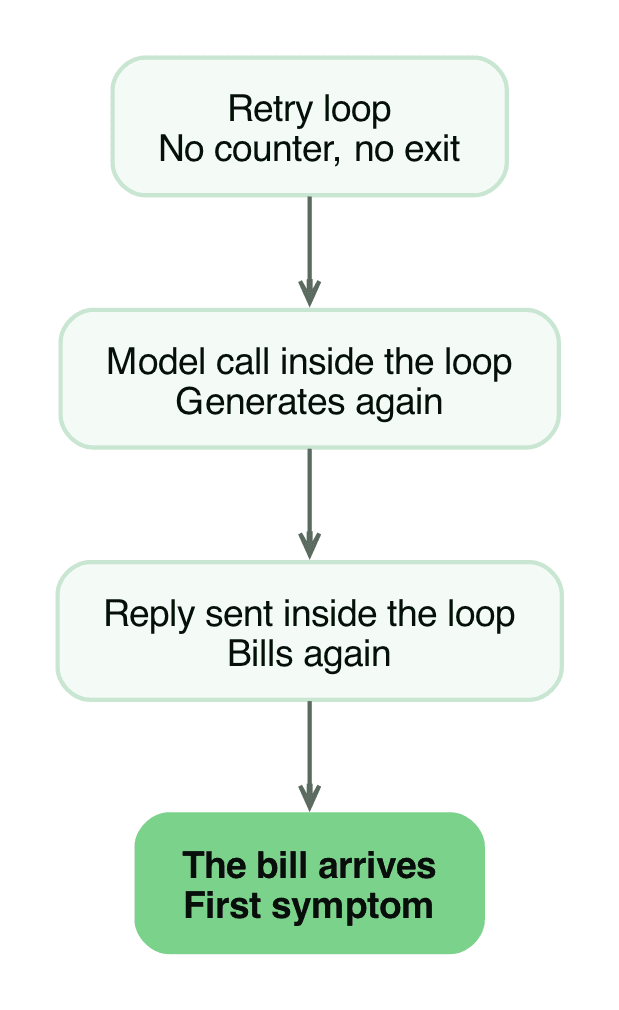
- Loops that bill. The worst one I have seen came from a developer trying to prevent failure. Every guard they added sat inside a loop, and the steps that call the model and send the reply sat inside it too. The workflow could never finish, so it kept generating, kept replying, and kept billing, and the bill was the first symptom anyone noticed. The fix was structural: generation and reply steps live outside any retry loop, and the loop carries a counter that stops it and pages a human.
- Duplicate records. Webhooks retry. Without an idempotency check, the same order gets created twice.
- Credentials and access. Every connection is a stored secret. When a staff member leaves, their credentials are still inside your workflows.
- Updates. Self-hosted means you own the upgrade, and a breaking change can stop three workflows at once.
- Inherited assumptions. A pipeline that was fine at low volume can fail silently as volume grows. When you take over a workflow, the first job is learning what it assumes about volume, then checking whether that still holds.
- Free-tier and API ceilings. Google Sheets and other services have their own quotas. Hitting one looks exactly like a broken workflow.
- One-person dependency. The person who built it is often the only person who understands it. Document the trigger, the steps and the recovery before they leave.
- WhatsApp constraints. The official WhatsApp Business Cloud node exists, but it works through the WhatsApp Business Platform, which requires a verified business and approved message templates for anything you send first. It is not a shortcut around the platform's rules (WhatsApp Business Cloud node, checked 3 October 2026).
- Timezone and drift. Schedules run in the server's timezone. On a foreign-hosted instance, your 8am reminder goes out at the wrong hour.
Build or buy
- Build it yourself if the process is simple, the volume is low, and you have one technical person who enjoys this work.
- Buy the build if the workflow touches money, runs all day, or breaks customer conversations when it fails. The cost of a freelance build is small next to the cost of a silently broken payment reminder.
- Buy the maintenance even if you built it. Workflows rot. APIs change, templates get rejected, sheets get renamed.
A reasonable middle path for a Nigerian small business: self-host n8n, build the two easiest workflows yourself to learn the shape of the tool, then pay someone to build and own the ones that touch cash.
Where to start on Monday
Pick workflow one. Build it, break it on purpose, and add an error notification. The second workflow will take half the time, because the pattern repeats.
If you would rather not own the plumbing, hand the workflow over to us and we will build it, monitor it and tell you which ones are not worth automating at all.
Work with us
We design, build and automate the software Nigerian businesses grow on.
Stay in the loop
Get the latest updates and insights delivered to your inbox.
More like this
WhatsApp Cloud API Registration: Fixing 'Could Not Connect'
You cannot register a number for the WhatsApp Cloud API from the App Dashboard, only from the API. Here is the call that works, the permissions it needs, and the errors you will hit.
Read ArticleWhatsApp Cloud API: number connected, token ready, sends fail
The App Dashboard says your token is generated and the number is connected, then every send fails. Here is the system user fix, step by step.
Read Article